Building Cython code
Cython code must, unlike Python, be compiled. This happens in two stages:
- A
.pyxfile is compiled by Cython to a.cfile, containing the code of a Python extension module- The
.cfile is compiled by a C compiler to a.sofile (or.pydon Windows) which can beimport-ed directly into a Python session.
There are several ways to build Cython code:
- Write a distutils
setup.py.- Use
pyximport, importing Cython.pyxfiles as if they were.pyfiles (using distutils to compile and build the background).- Run the
cythoncommand-line utility manually to produce the.cfile from the.pyxfile, then manually compiling the.cfile into a shared object library or.dllsuitable for import from Python. (This is mostly for debugging and experimentation.)- Use the [Sage] notebook which allows Cython code inline.
Currently, distutils is the most common way Cython files are built and distributed. The other methods are described in more detail in the Source Files and Compilation section of the reference manual.
Building a Cython module using distutils
Imagine a simple “hello world” script in a file hello.pyx:
def say_hello_to(name):
    print("Hello %s!" % name)
The following could be a corresponding setup.py script:
from distutils.core import setup
from distutils.extension import Extension
from Cython.Distutils import build_ext

ext_modules = [Extension("hello", ["hello.pyx"])]

setup(
  name = 'Hello world app',
  cmdclass = {'build_ext': build_ext},
  ext_modules = ext_modules
)
To build, run python setup.py build_ext --inplace. Then simply
start a Python session and do from hello import say_hello_to and
use the imported function as you see fit.
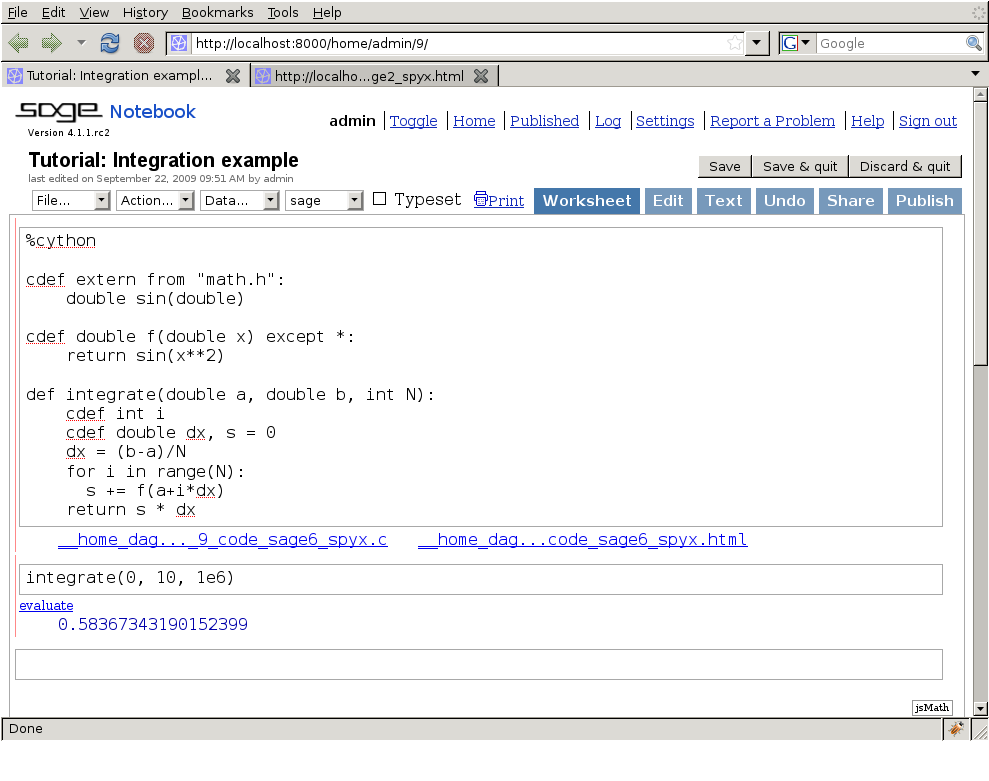
The Sage notebook allows transparently editing and compiling Cython
code simply by typing %cython at the top of a cell and evaluate
it. Variables and functions defined in a Cython cell imported into
the running session.
| [Sage] |
|